Lead generation
Google Maps lead generation that ends in a call, not a spreadsheet
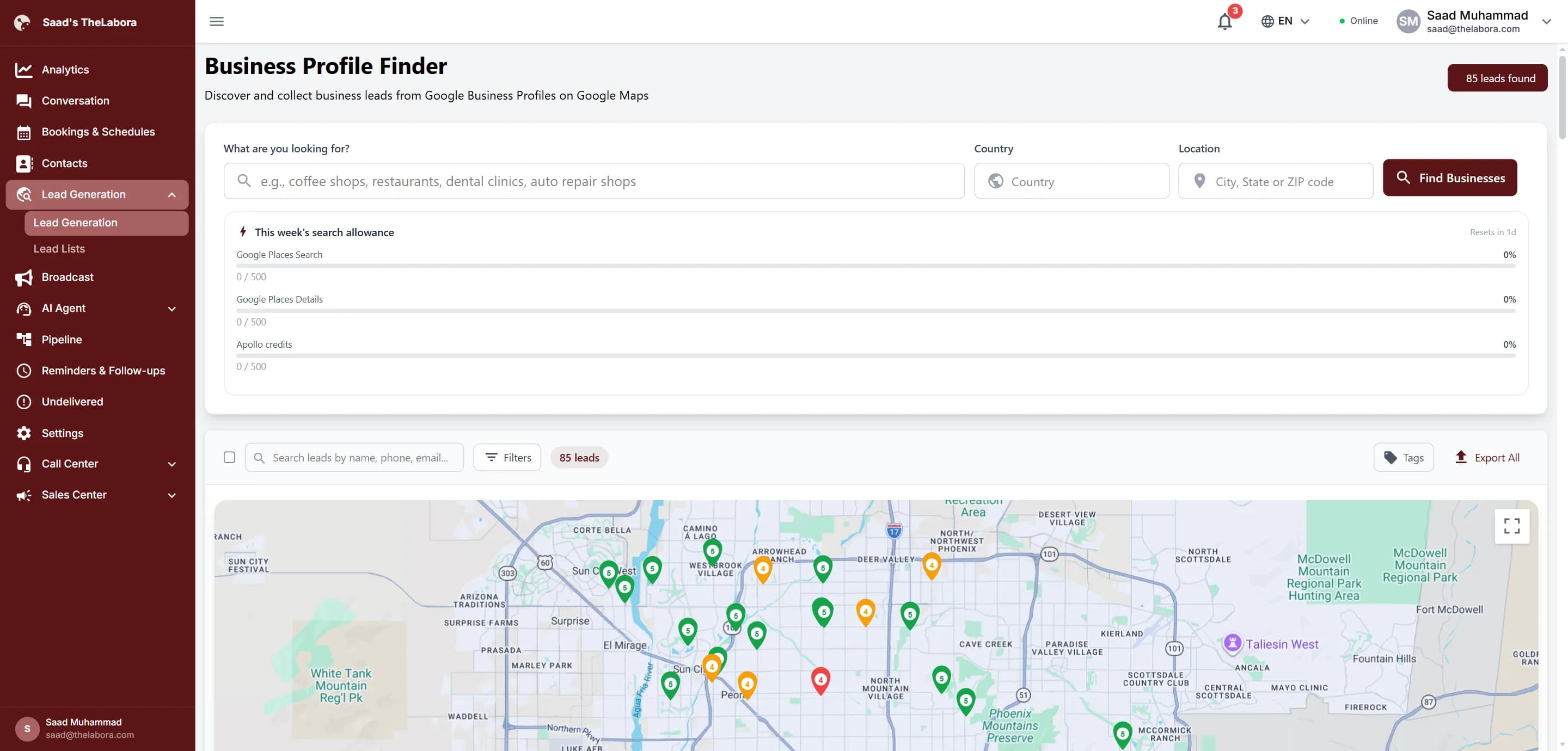
Tell BotnFlow what kind of business you want and where. Its Google Maps lead generation searches Google Business Profiles, pins every result on a map, reads each website for contact details and gives the lead a qualification score. The leads sit in the same workspace as your inbox, dialer and pipeline, so a list you build in the morning can be called the same day.
What it does
What the lead finder does for you
Search Google Business Profiles
Enter a keyword, a country and a city, then choose 100, 200, 300 or unlimited results. While it runs you see new leads, businesses already in your contacts and an estimated finish time.
Map, ratings and reviews
Every result is pinned on a map in a colour that follows its star rating. Open a business to see its address, phone, website, opening hours and reviews.
Enrichment that reads the website
Enrichment analyses the business website and collects its LinkedIn and Facebook links. It also notes whether the site already has a chatbot, WhatsApp, online booking, a call center line or an online store.
A status and a score
Each enriched lead gets a status of Premium, Qualified, Neutral or Disqualified and a score out of 100, with the signals behind it, such as reviews, social presence and website.
Apollo company data
Connect Apollo and your Premium and Qualified leads gain company details such as industry, headcount and revenue, plus decision makers with their titles and contact details.
Email validation
Validate the emails on any selection. Dead addresses are marked, and when a lead has a better address on file, that one becomes the primary.
How it works
How a search becomes outreach
- 01
Search an area
Type the kind of business you want, pick a country and a city, and choose how many results to look for. The search runs in the background and you can cancel it at any point.
- 02
Narrow the results
Switch between this search and all your leads. Filter by rating, category, score, source or country, and open any lead from the list or the map.
- 03
Enrich the best ones
Select leads and run Enrich. Full enrichment refreshes the Google details first. The second mode skips that refresh and still runs the website, social, scoring, Apollo and persona steps.
- 04
Reach out
Click a phone number to have an AI voice bot call, call from your browser or open the number in the dialer. Save leads to a list, add them to a pipeline, schedule a follow up email or set a reminder.
Who uses it
Who builds lists this way
- 01
Agencies selling to local businesses
Search one niche in one city, spot the businesses with no online booking or chat on their site, and open with the gap you can already see.
- 02
B2B sales teams
Build a territory list with phones, emails and ratings, then work it from the pipeline board and the dialer without exporting anything.
- 03
Teams that call first
Turn a search into a call list and let an AI voice bot place the first calls, where the rules in your market allow it.
Lead lists and AI personas
A lead list is a named set of leads to work through. Create one, copy it, rename it or delete it, and save leads into it in bulk straight from the results. Inside a list you can search, sort, filter for people the system suggests a follow up for, and see each member's outreach activity.
Every lead can also carry an AI persona: a short profile written from its enriched data and anything you add yourself, to help you decide how to open the conversation.
Getting leads out
Most teams never need to leave BotnFlow, but the data is yours. Export leads to Excel or PDF, pick the exact fields for a CSV or Excel file, or use Export for broadcast to get a file laid out for an email, SMS or voice broadcast.
- Excel and PDF exports
- A field picker for CSV and Excel
- Export for broadcast, ready for the broadcast wizard
- Businesses already in your contacts are flagged, not added twice
What to know before you start
- Lead discovery searches Google Business Profiles only. BotnFlow does not find leads from general web search or from social networks.
- Email addresses come from what a business publishes on its own website, or from Apollo when you connect it. Some businesses publish none.
- Searches and enrichment that run on the platform keys share a weekly allowance, shown as a meter on the page. Companies that connect their own Google Maps or Apollo key are not counted against it.
- You are responsible for the rules on cold calls, texts and emails in each country you contact.
Questions people ask
Where do the leads come from?
What does the score out of 100 mean?
Do I need my own Google Maps or Apollo key?
Can I call a lead straight from the results?
Can I bring in leads I already have in Apollo?
Works with
Related features
Contacts and pipeline
One contact per person across every channel, custom fields, bulk actions and a drag and drop deal pipeline with an AI next step.
How it worksSales dialer
Calling campaigns with a lead queue per rep, an AI talking script for each lead, call outcomes, callbacks and campaign analytics.
How it worksBroadcasts
AI voice call, SMS and bulk email campaigns with a test send, checks before launch, paced delivery and a live status for every recipient.
How it works
See lead generation in a demo
Book a demo and get a 30 day free trial. We walk you through the inbox, the AI agents and the CRM with your use case in mind, or ask the chat in the corner: it runs on BotnFlow.