Company Brain and Copilot
An AI knowledge base for customer support that every reply, agent and draft draws on
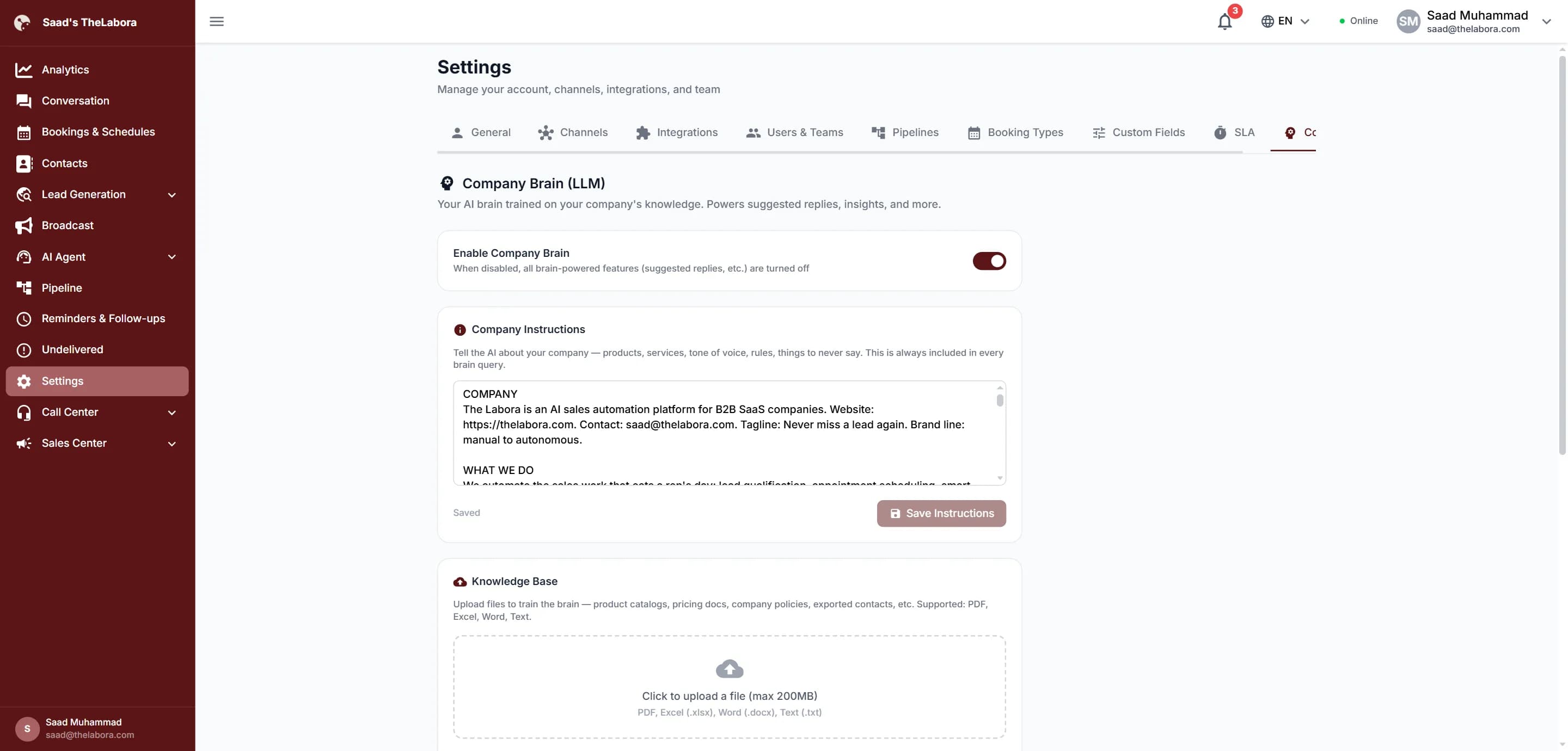
An AI that has never read your price list can only give generic answers. Company Brain is the AI knowledge base for customer support inside BotnFlow, the one place it learns your business: the files you upload, the web pages you point it at, the instructions you write and the records already in your account. Reply suggestions, AI agents, phone and email answers and email drafts all read from it. Copilot sits on every page, so your team can ask a question or get a task done without hunting through menus.
What it does
What Company Brain and Copilot give you
Your documents
Upload price lists, policies, service menus and FAQs as PDF, Word, Excel or text files, up to 200 MB each, with a progress bar for large files.
Your web pages
Paste the public pages it should read, several at once. Read a page again after you change it, or remove it when it is out of date.
Your own records
Contacts, leads, pipelines, bookings and conversations sync into the Brain every night at midnight, or straight away when you press Sync now.
Company Instructions
Write standing instructions once: your tone, what to call your services and what never to promise. They apply every time the Brain is asked.
AI reply suggestions
In the inbox, press Generate for replies drafted from the Brain. A suggestion fills the reply box, and a person edits it and sends it.
Copilot on every page
Ask about your contacts, conversations, broadcasts, deals and bookings in plain words, or ask it to do the work. Anything that changes data waits for your confirmation.
How it works
How to set it up
- 01
Switch Company Brain on
Open Settings, Company Brain and turn it on. The switch also controls reply suggestions and the other features that read from the Brain.
- 02
Feed it the facts
Write your Company Instructions, upload your key documents and add the web pages that describe what you sell. Start with what customers ask about most.
- 03
Let your records sync
Your contacts, leads, pipeline, bookings and conversations join the Brain at the nightly sync. Press Sync now after a large import so you do not have to wait.
- 04
Use it everywhere
Generate replies in the inbox, add an AI answer step to an agent, let the voice agent search it on calls, and open Copilot from any page when you need something done.
Who uses it
Where the knowledge base shows up
- 01
Support teams that answer faster
Reply suggestions come from your own policies and prices, so an agent edits a draft instead of typing from memory or searching a shared drive.
- 02
AI agents with real answers
The AI answer step, phone calls and email replies all read the Brain, so the agent quotes your actual hours and terms.
- 03
Managers who want a quick answer
Ask Copilot how many deals are in a stage or which bookings are on tomorrow instead of building a report.
What reads from Company Brain
The Brain is one source with many readers. Anything you add improves all of them at once, and a fact you correct is corrected everywhere.
- Reply suggestions in the shared inbox
- The AI answer step in AI agents
- Phone calls and email replies from the AI agent
- AI drafting in the email template builder
- AI next step suggestions on a contact's activity
Copilot works inside each person's permissions
Copilot is a permission you give each team member. It only offers actions in the parts of BotnFlow that person can open, so someone without access to broadcasts cannot send one through Copilot.
Questions are answered straight away. Anything that creates, changes, sends or deletes shows you what it is about to do and waits for you to confirm or cancel, and you can stop a reply at any time. Copilot runs on OpenAI models, and you pick the model in the drawer.
What the Brain can and cannot read
- Files: PDF, Excel (.xlsx), Word (.docx) and plain text (.txt), up to 200 MB each.
- Links: public pages only. Social network pages that need a login cannot be read, so copy that text into a document and upload it instead.
- Your records sync once a night unless you press Sync now, so a contact added this morning may not be known until then.
- Turning Company Brain off also turns off reply suggestions, the AI answer step and AI email drafting.
- Copilot is not shown on white label partner domains.
Questions people ask
What is an AI knowledge base?
Which files can I upload?
Do reply suggestions send themselves?
What can Copilot do?
Whose AI key does it use?
Works with
Related features
AI agents
AI agents that answer on WhatsApp and website chat from your own knowledge, collect details, book appointments and hand over to your team.
How it worksShared inbox
WhatsApp, SMS, email, calls and website chat in one team inbox, with one record per person and AI reply suggestions.
How it worksEmail
Amazon SES, SMTP or Gmail as one email channel, with a built in warm up, DNS checks, a template builder and a full composer in the inbox.
How it works
Used by: Healthcare and clinics, Pharmacies and healthcare retail, Car insurance, Online stores, Retail stores and chains, FMCG and dairy distribution, Restaurants and food service, Hotels and hospitality, Travel and tourism, Education and EdTech, Logistics and delivery, Banking and financial services, Telecom and customer care, Agencies
See Company Brain and Copilot in a demo
Book a demo and get a 30 day free trial. We walk you through the inbox, the AI agents and the CRM with your use case in mind, or ask the chat in the corner: it runs on BotnFlow.