Contacts and pipeline
A CRM with WhatsApp built in, so the record and the conversation never drift apart
When the CRM and the chat app are separate tools, someone has to copy every update across, and usually nobody does. In BotnFlow the contact list and the pipeline sit next to your WhatsApp, SMS, email and call history. A person who writes on two channels is one row, their activity builds into one timeline, and every deal on the board is one click from the conversation behind it.
What it does
What you can do with contacts and deals
One row per person
Someone who reaches you on WhatsApp and by email is one contact, not two. The row shows every channel they use, and their history stays together.
Custom fields in 11 types
Text, long text, number, money, date, dropdown, multi select, yes or no, phone, email and website. Make a field required, pin it to the top of the record or show it as a list column.
Filters that find the next job
Find people never contacted, people a broadcast has or has not reached, and people the system suggests a follow up for. Narrow by channel, lead score, source, country and whether a phone, email or website is on file.
Bulk actions
Select contacts across pages, then validate their emails, add them to a pipeline, schedule a follow up email, set a reminder or enrich them in one step.
Drag and drop pipeline
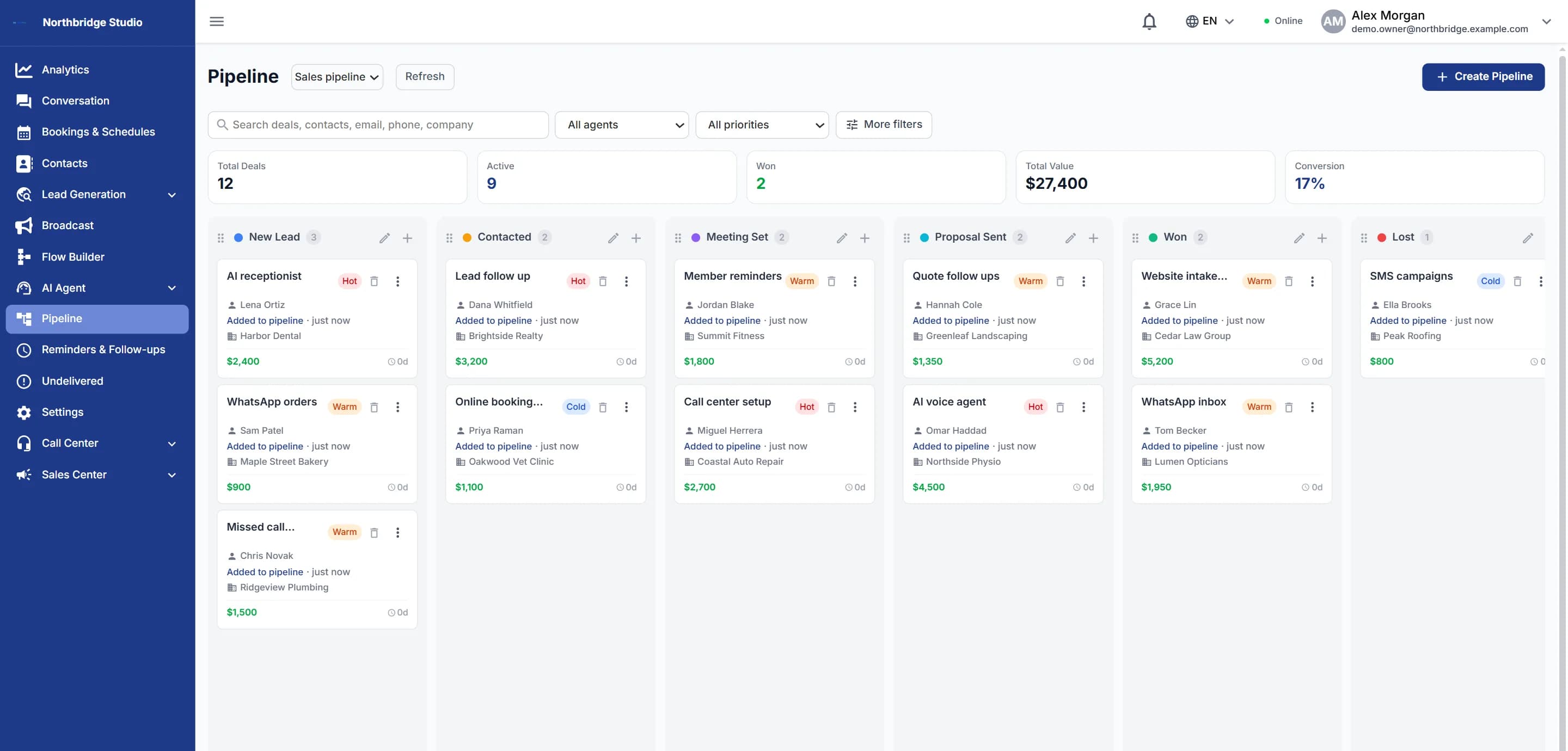
Drag deals between stages. Add, rename, recolour and reorder stages, choose which ones count as won or lost, and run more than one pipeline.
An AI next step
On a deal's Activity tab, Take AI suggestion reads the person's history and proposes one next step: the channel, the timing, the message and the reason. Nothing goes out until you send it.
How it works
How contacts turn into deals
- 01
Bring people in
Contacts are created as people message you on a connected channel. You can also add them by hand, import an Excel file built from the sample template, or import a CSV exported from Apollo.
- 02
Organise the record
Tag people, fill in custom fields, assign an owner and switch a contact between the AI agent and a person. Every action sits on the row menu, and the common ones work in bulk.
- 03
Create deals
Add a contact to a pipeline from the contact list, a lead list or lead generation, one at a time or many at once. Each deal carries a value, a Hot, Warm or Cold priority and an expected close date.
- 04
Work the board
Filter by owner, priority, value range, days stuck in a stage, date added, close date, source, email health and tags. Open a card to message, book, remind or follow up.
Who uses it
How teams use it
- 01
WhatsApp led sales
A lead writes on WhatsApp, becomes a contact with a tag and an owner, and moves through your stages while the chat carries on in the inbox.
- 02
Agencies with several offers
Run one pipeline per service, keep a value on every deal and read total value and conversion at the top of the board.
- 03
Reviving an old spreadsheet
Import the file, filter for people never contacted, validate the emails and move the good ones into a pipeline or a broadcast.
A pipeline that stays up to date
Pipelines go stale when updating them is a separate chore. Here the card menu does the next job from the board: open the conversation, set a reminder, book an appointment or schedule a follow up email. Moving a deal into a won or lost stage asks you to confirm, and a lost deal can record the reason.
Each deal opens into tabs for deal details, the contact with their custom fields, notes, activity and actions. Cards across the top show total deals, active, won, total value and conversion, and they follow whatever filters you apply.
Visibility, blocking and deleting
You can limit a team member to the contacts assigned to them, and the rule is enforced on the server. Blocking a contact marks them do not contact and stops outbound messages to them on every channel.
Deleting moves a contact to a Deleted view. Conversations, calls, bookings, follow ups and the activity log stay as history, and an admin can restore the contact. Only the owner or a super admin can delete one forever.
Good to know
- Deal values are shown in US dollars today. There is no currency setting.
- Custom fields appear on the record and as list columns. Filtering contacts by a custom field is not available today.
- Take AI suggestion needs Company Brain switched on.
Questions people ask
Is BotnFlow a CRM with WhatsApp?
Can I import my existing contacts?
Can I export my contacts?
Can I run more than one pipeline?
Does the AI change my deals on its own?
Works with
Related features
Shared inbox
WhatsApp, SMS, email, calls and website chat in one team inbox, with one record per person and AI reply suggestions.
How it worksLead generation
Search Google Business Profiles by keyword and city, enrich each business, score it out of 100 and start the outreach from the same screen.
How it worksFollow ups and reminders
Follow up emails and sequences that stop when the person replies, reminders that ring for your team, and a daily list of who to chase.
How it works
Used by: Beauty, wellness and fitness, Real estate, Car dealerships, Retail stores and chains, Hotels and hospitality, Travel and tourism, Trades and home services, Education and EdTech, Banking and financial services, Agencies, Outbound sales teams
See contacts and pipeline in a demo
Book a demo and get a 30 day free trial. We walk you through the inbox, the AI agents and the CRM with your use case in mind, or ask the chat in the corner: it runs on BotnFlow.