AI agents
An AI chatbot for WhatsApp that answers, collects details and books for you
Most customer messages are the same few questions asked in different words. A BotnFlow AI chatbot for WhatsApp and your website chat learns those questions, answers them and takes the next step: it asks for the details you need, books the appointment or passes the conversation to a person. Every message it handles is logged with what it understood and how sure it was, so you can see where it needs more training.
What it does
What an AI agent can do
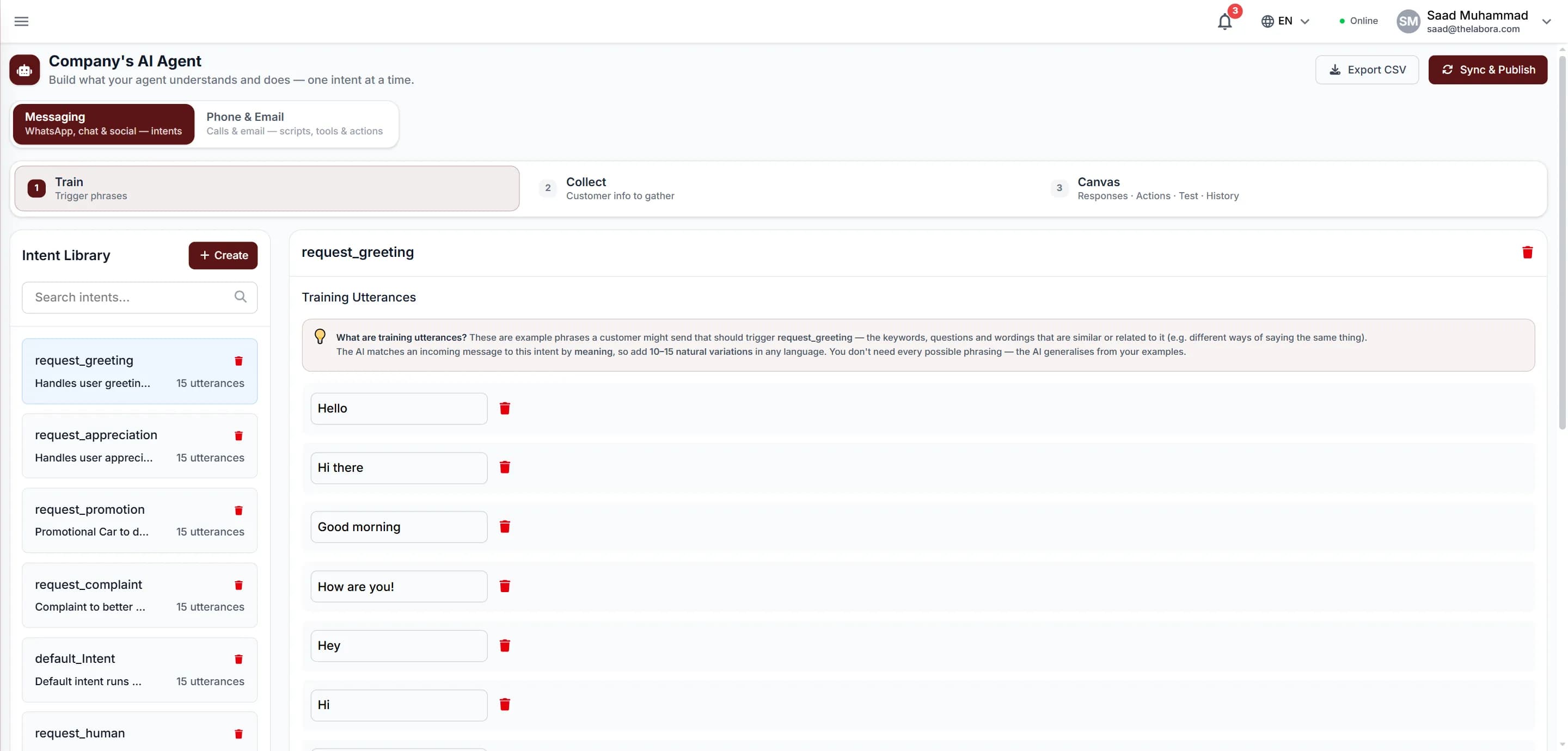
Intents you train
Each kind of request is an intent in the agent's library. You train it with the phrases customers really use, and the agent matches new messages to the closest intent.
Replies built from steps
Lay out each answer on a canvas: a message, an image, a video, a document or audio, an AI answer, a step that collects details, a booking or a handover to a person.
Answers from your knowledge
The AI answer step writes its reply from your Company Brain. Add guidance for that intent, live data lookups from your own systems and a line to send when it cannot answer.
Collects and books
Ask for a name, an email or an order number and save the answers to BotnFlow or send them to your own system. The booking step checks real availability before it confirms a slot.
Email from the same agent
Give the agent an email script and choose how it replies: a draft for a person to send, or automatic replies that fall back to a draft and an alert when it is unsure.
Shows what it missed
AI Insights lists the messages it did not understand and the ones it matched weakly. Add to intent puts the customer's own words into the training for next time.
How it works
From empty agent to live answers
- 01
Create the agent
Give it a name, a description and a type such as support, sales or order tracking. Assign the channels it should answer; assigning a channel is what switches it on.
- 02
Train each intent
Add the phrases that belong to the intent, list any details to collect, then build the reply on the canvas. Sync and publish when it reads right.
- 03
Test it for real
Type as a customer in the Test view. The real matching, forms, API calls and AI answers run, and a trace shows what each step did. Test contacts and bookings are marked so they never pass for real ones.
- 04
Watch and improve
AI Performance shows how much was understood and handed to a person. Agent History shows each conversation message by message, and AI Insights turns misses into training.
Who uses it
Where AI agents help most
- 01
Questions outside office hours
Prices, opening times and availability get answered at night and at weekends, and an appointment can be booked before the customer moves on.
- 02
Order and delivery updates
Connect your order system as a live data lookup so the agent can answer where is my order, and route refunds and complaints to a person.
- 03
Qualifying new leads
Ask your qualifying questions on WhatsApp, save the answers on the contact and pass the promising ones to a salesperson in the shared inbox.
Every answer can be checked
AI Performance shows messages handled, the share understood, the share handed to a person and the share of weak matches, where confidence was under 50 percent. It also shows where messages came from, how fast the agent answered and which intents did the work.
Agent History groups runs by conversation. Open one to see each message, the intent that caught it, how confident the match was and what the agent did next. Filter by channel, outcome, confidence or date, and phone calls appear here too.
- Understood and handed over shares
- Weak matches under 50 percent confidence
- Answer speed
- Intent and confidence on every message
- Phone calls in the same history
Your agents, your AI key
Create an agent for each job, duplicate one to start the next, export one to a spreadsheet and filter the list by type: support, sales, FAQ, order tracking, returns or product information.
Connect your own OpenAI key in Settings and BotnFlow uses it first for your company. Without a key, the platform AI answers instead, so you can start before you have one.
What to know before you start
- Messaging agents answer on WhatsApp (Business API and linked phone) and website chat. They do not reply to SMS today.
- Calls are answered by the same agent through its voice bot, which is set up on the Phone and Email face.
- The AI answer step needs Company Brain switched on. Without it, the agent replies with the steps you wrote.
- The AI runs on OpenAI models. Other AI providers cannot be connected today.
- Agent History keeps each run for 30 days, then removes it automatically.
Questions people ask
Do I need to write code to build an AI agent?
Which channels does an AI agent answer?
Will the AI agent make things up?
Can the agent hand a conversation to a person?
Which AI does it use?
Works with
Related features
Company Brain and Copilot
Company Brain holds your documents, web pages and records for every AI feature, and Copilot answers questions and does tasks for your team.
How it worksAI voice agents
An AI voice agent that answers and makes calls on your own Twilio numbers, books appointments, takes messages and hands callers to your team.
How it worksWhatsApp
Connect the WhatsApp Business API or link a phone with a QR code, manage templates and answer every chat from the shared inbox.
How it works
Used by: Healthcare and clinics, Pharmacies and healthcare retail, Beauty, wellness and fitness, Real estate, Car dealerships, Car insurance, Online stores, Retail stores and chains, FMCG and dairy distribution, Restaurants and food service, Hotels and hospitality, Travel and tourism, Education and EdTech, Logistics and delivery, Banking and financial services, Telecom and customer care, Agencies
See AI agents in a demo
Book a demo and get a 30 day free trial. We walk you through the inbox, the AI agents and the CRM with your use case in mind, or ask the chat in the corner: it runs on BotnFlow.